Jump to a question in this guide
- What is the difference between the battery, charger and device?
- Why do heat, damage and covered vents matter?
- Will this replacement battery or charger actually match?
- Where should ordinary charging happen?
- What should I notice about the charger, cord and lights?
- What changes if a battery is wet, cold or stored for the season?
- What does a damaged or swollen battery actually look like?
- How do I check a recall or explain the concern to support?
- Can I put the old battery in a collection box or mail it back?
- Does a shorter runtime mean the battery is becoming dangerous?
- What is worth keeping for the next person who uses it?
- The battery stores energy; the charger replenishes it; the device uses it. Match all three to the actual product instructions.
- A swollen shell, split case, damaged cord or moisture concern needs attention before the next charge. You do not need to open the pack to recognize a problem.
- A shorter runtime is a different question from physical damage. Smoke, sparks or fire require an immediate emergency response.

The tool uses stored energy, the intact pack stores it and the intended charger replenishes it. The components are separated for identification; exposed ordinary connector areas do not reveal internal cells. Matching colours and compatible-looking shapes cannot establish the actual approved pairing.
About this illustration
No actual model identities, certification, compatibility, cell condition, capacity, charge state or working result is established. This is not a battery-opening or connector-modification lesson.
10 picture lessons appear beside the questions in this guide. Use them to understand the explanation, then consider what it means for your home.
What is the difference between the battery, charger and device?
A phone that changes shape, a drill battery with a cracked corner and a charger cable that has split at the end are problems you can recognize without knowing battery chemistry. Understanding which part has changed helps you stop the right activity and explain the concern. It also helps you avoid buying a new charger for a problem that may belong somewhere else.
The battery stores energy. The device—your drill, vacuum, laptop or e-bike—uses that energy to do its work. The charger puts energy back through the product’s intended charging arrangement. A removable tool pack contains its battery parts inside a protective case; many phones and laptops keep the battery inside the device itself. Neither arrangement is an invitation to open it.
Look at the original picture as three separate jobs. The tool does the work, the enclosed pack supplies it and the charger serves the matching pack. The shape of the connection helps identify the parts, but the written product instructions decide which combination belongs together. Two grey packs or two similar plugs are not automatically interchangeable.
Keep the model identities and manual link while the equipment is in ordinary condition. Then, if something changes, you can ask a clear question: “This pack belongs to this tool and charger; the case has started separating.” You should not have to touch a suspect item, open a cover or recreate a fault just to collect a better description.
This guide covers portable consumer equipment. An installed home backup battery has additional installation, control and emergency questions covered in its own guide. The examples here are original teaching illustrations, not photographs of tested products or a finding about the battery in your home.
The tool, battery pack and charger have different jobs
The tool uses stored energy, the intact pack stores it and the intended charger replenishes it. The components are separated for identification; exposed ordinary connector areas do not reveal internal cells. Matching colours and compatible-looking shapes cannot establish the actual approved pairing.
Choose a part name to highlight its explanation below.
- Tool
Uses energy for its intended function; its own identity matters.
- Enclosed battery pack
Stores energy within the intact case; no cells are opened.
- Charger
Supplies energy through the intended charging arrangement.
- Ordinary connector areas
Visible shapes are not evidence of exact pairing, condition or authenticity.
About this illustration
No actual model identities, certification, compatibility, cell condition, capacity, charge state or working result is established. This is not a battery-opening or connector-modification lesson.
Why do heat, damage and covered vents matter?
A charger needs an appropriate place to operate as well as the right battery. Its case may have ventilation slots that let heat escape. Covering those slots with a cloth or pressing them against stored belongings changes the surroundings the equipment was designed to use. The close-up makes the openings recognizable so “keep it ventilated” means more than keeping the room door open.
The charger picture shows the slots and the space around them. The air marks explain their job; they do not specify a fan design, a measured airflow or a clearance for every charger. Check the actual manual for that equipment. A neatly arranged charging shelf can still hide a vent against its back or put a charger beneath a pile of gloves.
The same room can contain several different concerns: a charger with damaged insulation, a pack that was dropped, or an intact product covered by bedding. They should not all be described as “the battery getting old”. Name the part and what happened. That gives support a better starting point and keeps a replacement purchase tied to the actual problem.
Do not feel a suspect pack to decide how hot it is or run another charge to compare the result. Public safety guidance identifies heat, damage and unsuitable charging conditions as risks, while the actual manufacturer supplies the product’s limits. A case that looks ordinary from the outside does not give you an internal condition check.
Charger vents need open air
The charger's ventilation slots need open air around them. A cloth, piled storage or a soft surface can cover the openings and hold heat around the equipment. The airflow marks explain the job of the open space; they are not a tested airflow pattern or a universal clearance.
Choose a part name to highlight its explanation below.
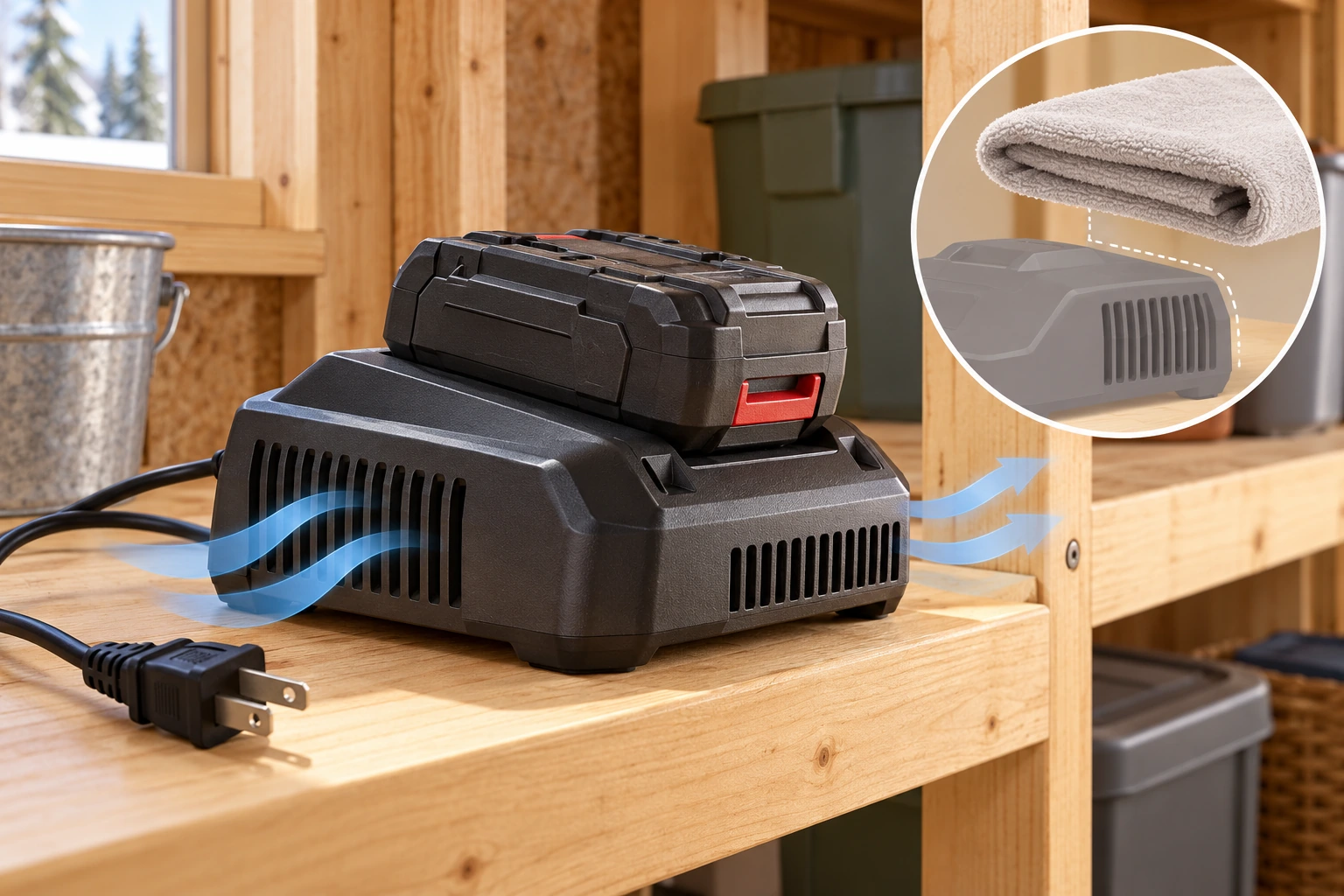
- Ventilation slots
Openings help release heat around the charging equipment.
- Open air
Surrounding space lets the openings do their job; no universal clearance is shown.
- Covering concern
A cloth or storage can obstruct the openings.
About this illustration
Original teaching illustration. The actual equipment and its instructions determine the applicable details.
Will this replacement battery or charger actually match?
A replacement that fits is tempting, especially when the original has become expensive or hard to find. Before buying, match the device model, battery identity and charger identity to the manufacturer’s instructions or answer. The original manufacturer or its retailer is the useful first contact when the intended combination is uncertain.
Treat a marketplace description such as “universal”, “replacement for” or “compatible” as a claim to verify. Do not settle the question by pushing the plug in or waiting for a light. Keep the actual listing and seller details with the manufacturer’s answer so the item that arrives can be compared with the item that was discussed.
Electrical certification and product matching are separate questions. Health Canada identifies recognized Canadian marks for chargers; that does not mean a pictured mark proves authenticity or that a certified charger suits every device. Transport Canada also cautions that a problematic replacement battery may have no obvious visual warning. A convincing shell is not a home authenticity test.
The three-part figure keeps the decision simple: identify the device, identify the pack and identify the intended charger. If one identity is missing, ask before using the replacement. Do not modify a connector, bridge contacts or add an improvised adapter to make the pieces work together.
Three parts need one intended match
A fitting connector is only one visible feature. Start with the exact product instructions.
Choose a part name to highlight its explanation below.
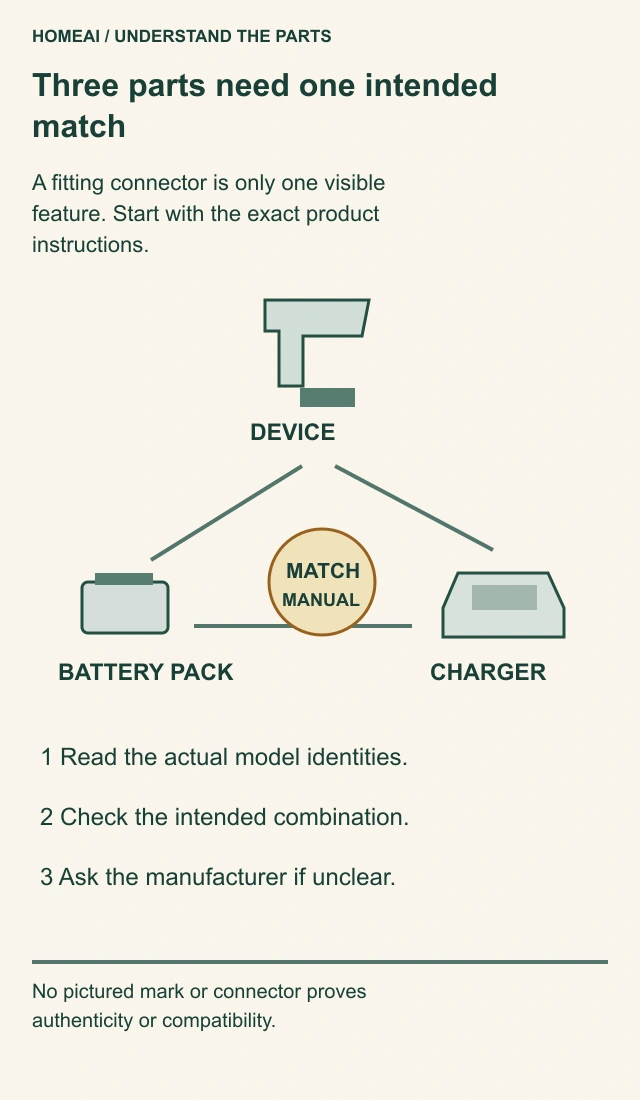
- Device
Its actual model identifies the product instructions.
- Battery pack
Confirm the intended pack family and model.
- Charger
Confirm the manufacturer-approved pairing.
- Keep together
Actual model identities, manual link, receipt and manufacturer answer.
About this illustration
No pictured mark or connector proves authenticity or compatibility.
Three parts need one intended match
A fitting connector is only one visible feature. Start with the exact product instructions.
- Device
- Its actual model identifies the product instructions.
- Battery pack
- Confirm the intended pack family and model.
- Charger
- Confirm the manufacturer-approved pairing.
- Keep together
- Actual model identities, manual link, receipt and manufacturer answer.
Read all the diagram text
- HOMEAI / UNDERSTAND THE PARTS
- Three parts need one intended
- match
- A fitting connector is only one visible
- feature. Start with the exact product
- instructions.
- DEVICE
- BATTERY PACK
- CHARGER
- MATCH
- MANUAL
- 1 Read the actual model identities.
- 2 Check the intended combination.
- 3 Ask the manufacturer if unclear.
- No pictured mark or connector proves
- authenticity or compatibility.
Where should ordinary charging happen?
Choose the place around the equipment, not just the nearest empty socket. A charger squeezed behind stored bags may be difficult to see and poorly ventilated. A phone under a pillow or on a couch can have heat held around it. An e-bike parked beside the only exit introduces a different household concern even if its charger is the correct one.
The room cutaway connects three useful ideas: an appropriate firm surface, room to see the equipment and a route people can use to leave. It is a conceptual arrangement, not an approved room layout. Follow the equipment instructions and applicable building-management or local safety advice for the actual space.
Keep charging visible and follow the product’s directions for completion. Someone should understand what is being charged and what normal completion looks like. That is more useful than an unfamiliar light left on overnight with no one knowing whether the process finished or stopped with a fault.
Moving equipment to a garage does not answer every question. The new place can introduce cold, dampness, stored combustibles or a charger hidden from view. Consider the conditions through the season. Smoke alarms and a household escape plan remain separate essentials; a well-organized shelf cannot replace them.
The charging place includes its surroundings and the route out
The intact charger and pack sit on a firm bench separate from the central walking route toward the open door. This helps a reader examine equipment placement, visibility and the way out together. Heating equipment and stored items also appear in the room; the illustration does not establish their clearances or a suitable room temperature.
Choose a part name to highlight its explanation below.

- Intact charging equipment
Represents an ordinary matched-equipment question; no actual pairing is certified.
- Firm bench
Shows a surface separate from a bed, couch or covering; suitability still needs actual instructions.
- Open route
The visible central path connects toward the exit without charging equipment on it.
- Surroundings
Heating equipment and storage remain separate location questions, not assessed safe clearances.
About this illustration
Actual device pairing, battery condition, outlet/load suitability, heat/moisture conditions, fire separation and safe charging location are unassessed. An open door is visible, not a prescribed routine.
What should I notice about the charger, cord and lights?
The cable carries power to the charger, and the moulded strain relief supports it where repeated bending would otherwise concentrate at one point. The plug and charger case protect other connections. In the close-up, split insulation and a broken plug are visible defects—not merely cosmetic differences to ignore because a light still comes on.
Apple’s iPhone safety instructions identify frayed cables, damaged prongs, excessive moisture and a damaged adapter enclosure as reasons to stop using that equipment. Milwaukee’s named charger manual likewise says not to use a damaged cord or plug. These examples explain why the charging equipment deserves attention alongside the pack. They do not authorize a taped splice or owner repair.
Read a charging light through the correct manual. One model’s flashing light can mean it is waiting for a battery temperature to change; another pattern may refer to a fault involving the pack or charger. Colour alone cannot tell you which part has failed. Keep the wording or pattern already observed rather than creating repeated fault cycles for a video.
If the equipment shows physical damage, do not use an ordinary troubleshooting sequence to override that concern. Ask the manufacturer which support or replacement route applies. A charger that later displays its usual light has not explained an earlier damaged cable, wet connection or distorted pack.
A damaged cord or plug belongs to the charger problem
The cord's outer jacket and moulded strain relief protect the conductors where the cable bends. Fraying, split insulation or a broken plug belongs in a stop-use conversation about the charger. Wrapping the defect in tape does not establish that the charger is fit to use.
Choose a part name to highlight its explanation below.
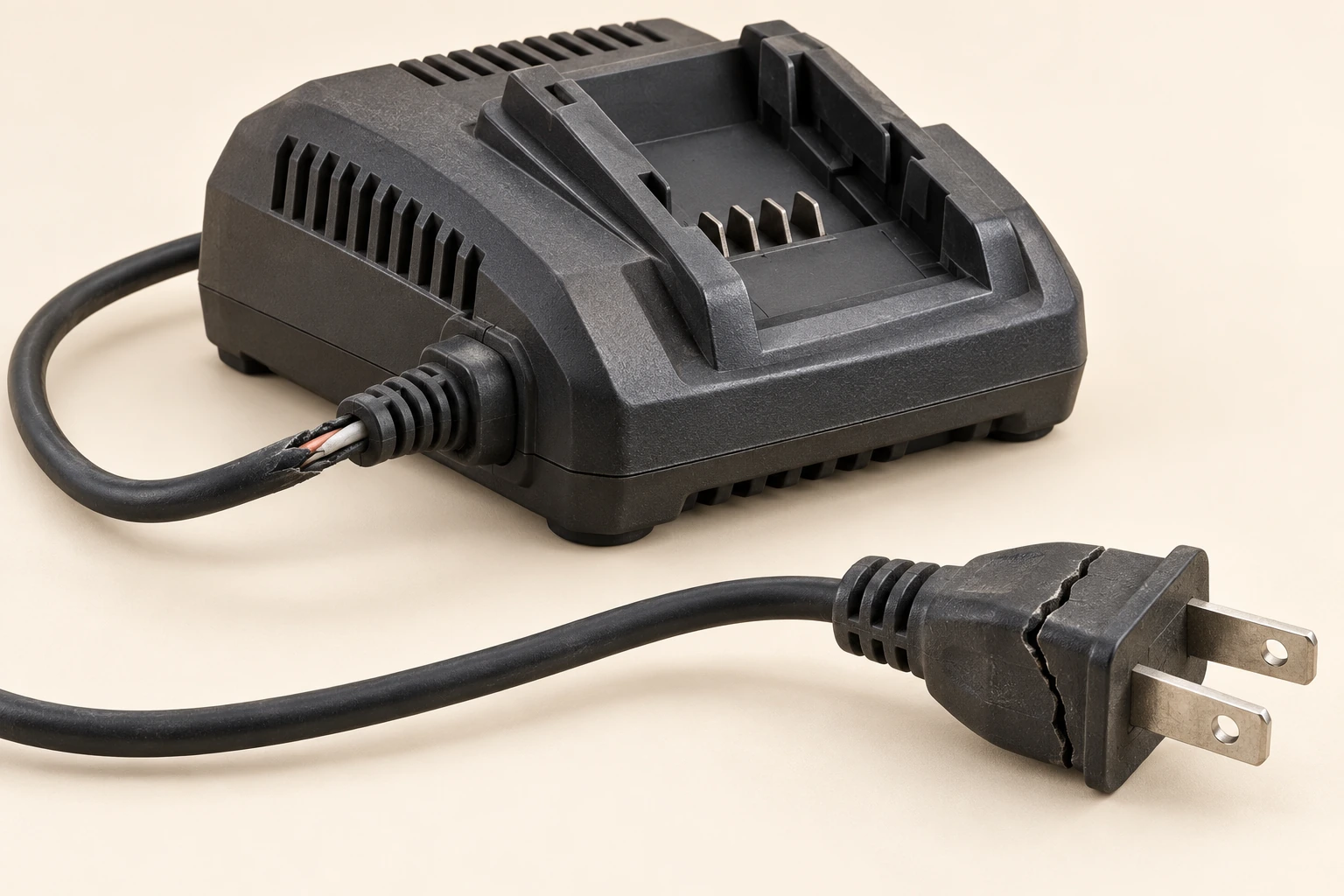
- Charger bay
The battery is absent and the charger is disconnected.
- Cable and strain relief
The split outer covering is a visible damage concern.
- Plug body
A separate broken plug is another reason to stop using the charger.
About this illustration
Original teaching illustration. The actual equipment and its instructions determine the applicable details.
What changes if a battery is wet, cold or stored for the season?
A tool battery’s contacts are the metal connection points that meet the tool or charger. The contact picture shows two different observations: moisture in one connection recess and corrosion around contacts on another example. They are not a before-and-after sequence. Their purpose is to help you say what you can already see, without touching contacts or cleaning them to try another charge.
Milwaukee’s retained manual describes damp storage and contact corrosion, and warns against fluid entering the pack or charger. Apple separately warns against charging its device when moisture is present. Follow the actual product’s advice after exposure. An exterior that has dried does not tell you whether moisture reached a concealed connection.
Cold use and cold charging are different tasks. A tool may have instructions for work in cold weather while its charger has its own permitted conditions. Do not copy a temperature rule, warming method or indicator meaning from a different product. Give support the actual model and the conditions it experienced; do not use direct heat to hurry a suspect pack back into service.
For seasonal storage, consult the matching instructions before choosing a charge level, place or check interval. Keep them with the equipment so spring return does not depend on memory. Storage instructions for an ordinary undamaged item do not clear a pack that suffered an impact, water exposure or an opening case seam during the winter.
Moisture and corrosion at battery contacts
The exposed contacts connect the pack with its tool or charger. Moisture at a connection and corrosion around a contact are reasons to stop and ask for product-specific advice. These are separate examples, not a cleaning recipe or proof that every deposit has the same cause.
Choose a part name to highlight its explanation below.
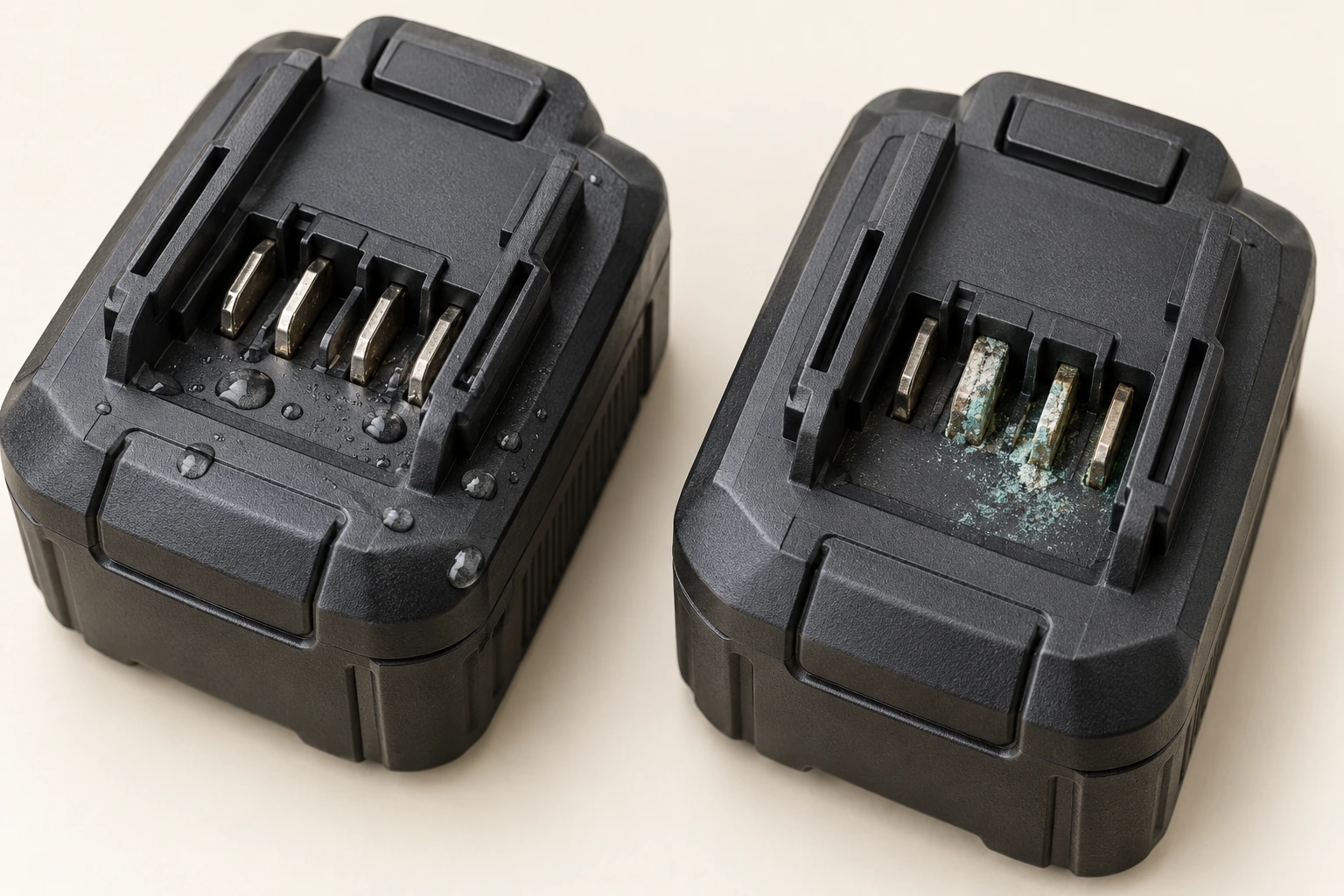
- Contacts
The recessed connection points meet the intended tool or charger.
- Moisture example
Visible water at a connection needs model-specific advice.
- Corrosion example
The separate deposit example is not a cleaning or return-to-use instruction.
About this illustration
Original teaching illustration. The actual equipment and its instructions determine the applicable details.
What does a damaged or swollen battery actually look like?
Swelling can change an enclosed product’s shape. The power-bank comparison shows a bowed shell and a seam beginning to open. The laptop example shows a distorted lower enclosure. Stop using and charging equipment when swelling is suspected, and contact its manufacturer for advice. Do not squeeze it flat, force a cover closed or pry the battery out.
The laptop picture teaches an external warning, not a diagnosis from every gap. A loose panel can have other explanations. You do not need to discover the hidden cause yourself before pausing use and asking for help. Dell’s technical guidance specifically warns against pressing, bending or prying swollen batteries and directs owners to product support.
The tool-pack close-up shows another kind of damage: a dented corner and a crack through the protective case. A pack may still slide onto the tool even though its enclosure is damaged. Do not treat connector fit or a remaining charge as permission to keep working. Report the impact and visible change to the manufacturer without opening the case.
Keep the observations separate. A swollen shell, an impact crack, moisture at contacts and a frayed charger cord are not four photographs of the same failure. They help you recognize different reasons to stop and ask. None requires you to press a button, smell the device, feel its temperature, dismantle it or demonstrate the problem again.
Smoke, sparks or fire change the priority immediately: leave the danger and call 911 from a safe place. Do not carry a failing device through the home for a photograph or wait for an online support reply. Follow emergency responders’ directions. For a concern without those urgent signs, obtain manufacturer and local safety advice before handling, transport or disposal.
A bulging power bank or opening case seam
A bulging shell or a seam that has started opening is a reason to stop using and charging the device. Do not squeeze it flat or pry the case apart. The flat comparison shows shape only; it does not certify the condition inside.
Choose a part name to highlight its explanation below.
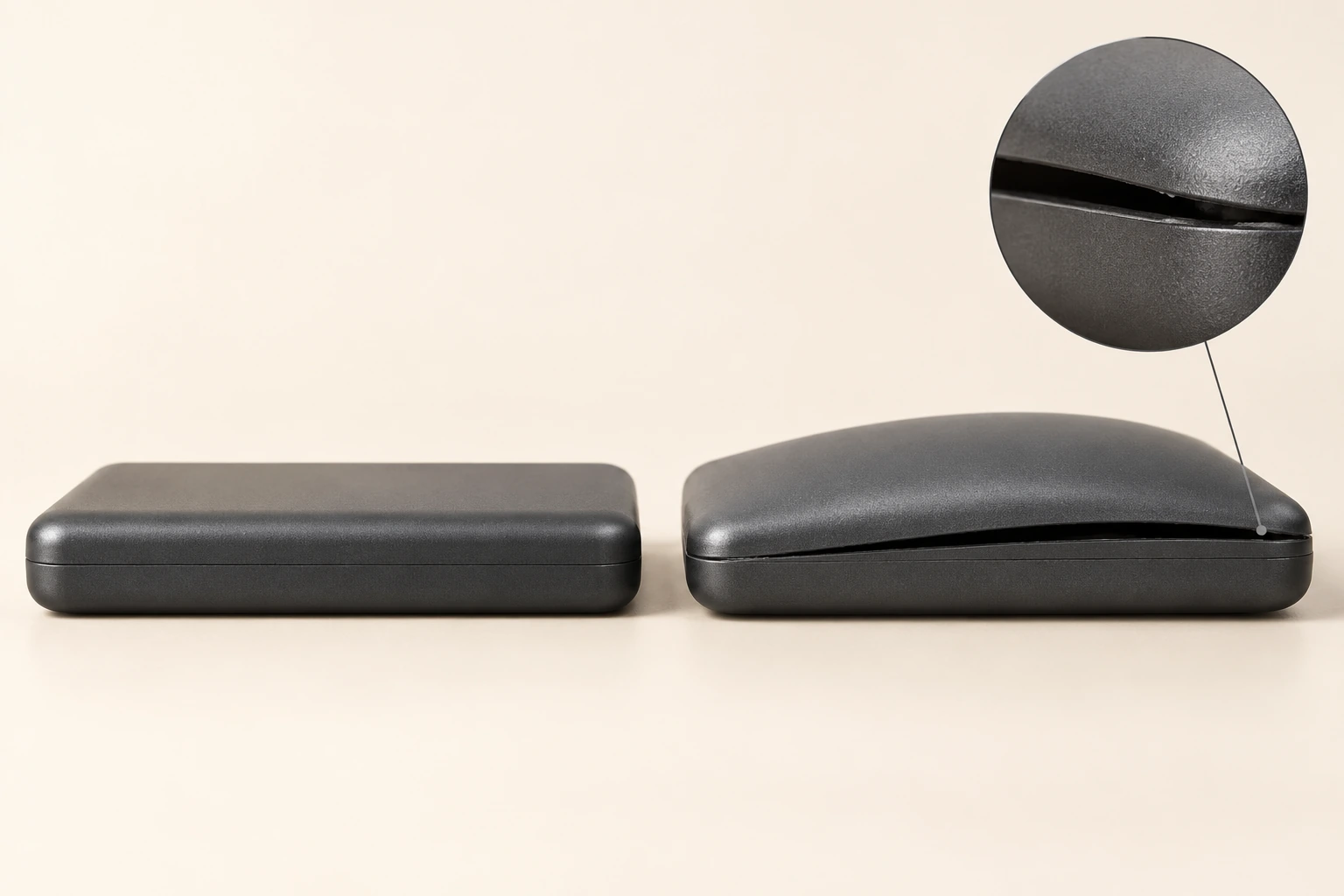
- Closed shell
The enclosure gives the battery a protective outer shape.
- Outward bulge
The changed shape is the feature to recognize without touching or opening it.
- Opening seam
Separation of the enclosure needs manufacturer attention before further use or charging.
About this illustration
Original teaching illustration. The actual equipment and its instructions determine the applicable details.
A bowed laptop case needs attention
A battery can affect the enclosure around it. An unexpectedly bowed base or opening case seam needs manufacturer attention; do not press the device back into shape or open it to find the cause. This illustrated gap is not a diagnosis of every loose laptop panel.
Choose a part name to highlight its explanation below.

- Laptop enclosure
The closed device surrounds its battery and other parts.
- Raised front edge
An unexpected outward bow is a visible change to describe to the manufacturer.
- Opening seam
Do not force the device flat or remove its cover to investigate.
About this illustration
Original teaching illustration. The actual equipment and its instructions determine the applicable details.
A split battery case is damage even if the pack still fits
The case protects the pack and its connections. A crushed corner or split casing is damage even if the pack still fits the tool. Stop using the damaged item and ask its manufacturer about the appropriate service or retirement route.
Choose a part name to highlight its explanation below.
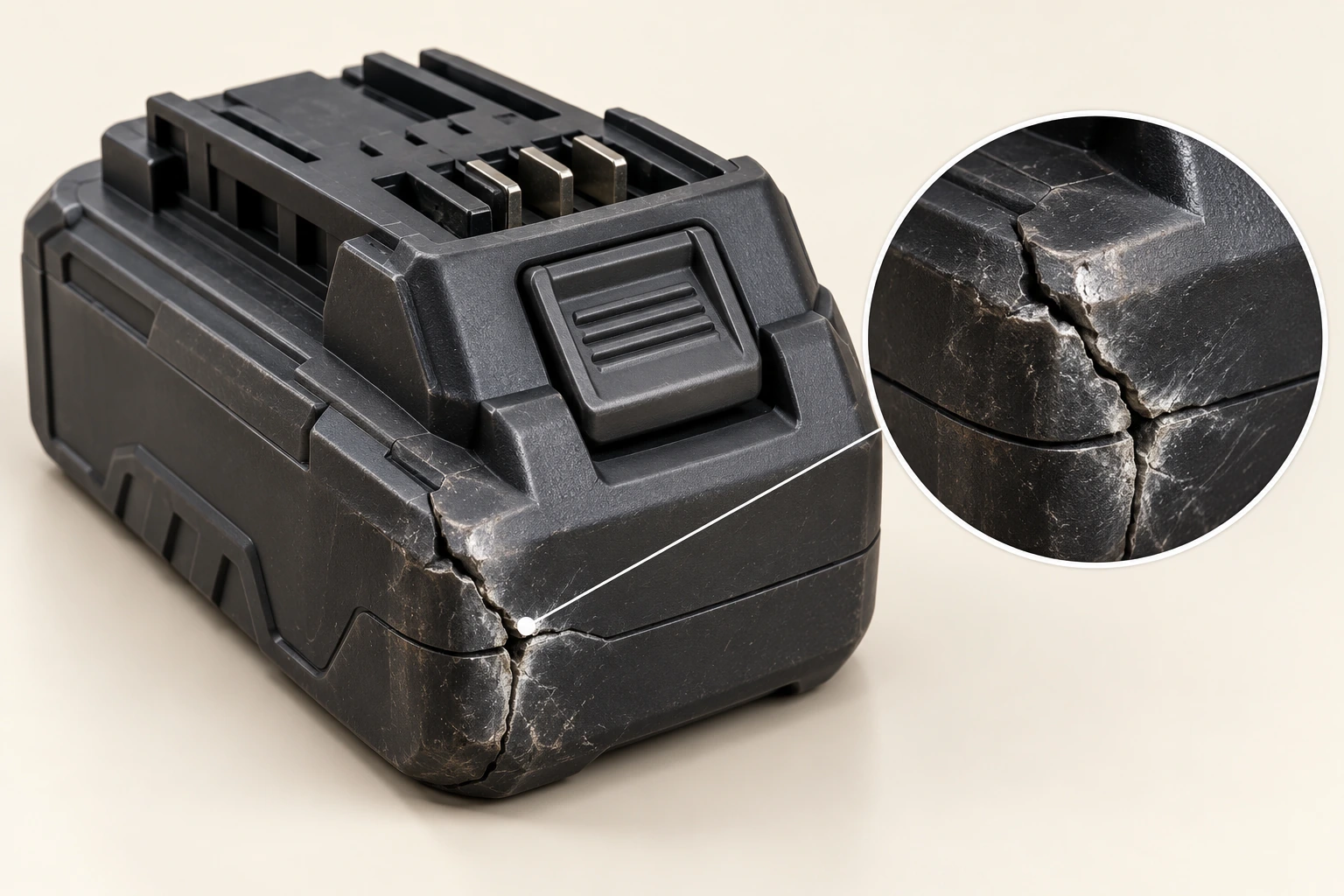
- Protective case
The assembled enclosure protects the pack.
- Damaged corner
The dent and split show impact damage.
- Connection rails
A pack fitting the tool does not clear the visible damage.
About this illustration
Original teaching illustration. The actual equipment and its instructions determine the applicable details.
How do I check a recall or explain the concern to support?
Start with the model and any serial or batch identity already available safely. A recall or manufacturer notice may cover a particular range rather than everything with the same brand. Match its stated scope to the actual item. If the identity cannot be read safely, explain that to support instead of handling a suspect pack for a photograph.
Give a short useful description: which device, pack and charger are involved; what changed; when it was first noticed; and whether an impact, exposure or service task is already known. “The lower case seam opened” is clearer than “it seems bad”. A description does not have to include a home test result.
Keep the actual response. Ask which item should stay out of use and what support is proposing to examine or replace. A new charger is not an assessment of the old pack’s internal condition. A replaced pack does not by itself assess a damaged tool, cable or charging location.
Not finding a matching notice is not the same as having a damaged device cleared for use. The visible concern still needs the appropriate response. Record where and when a notice was checked, and retain the manufacturer’s directions for this item rather than a general reassurance passed between household members.
Can I put the old battery in a collection box or mail it back?
Batteries should not go into household garbage. Before choosing a collection box, ask the receiving service about the actual item and its condition. An ordinary end-of-life pack and a swollen, cracked or otherwise damaged item may need different handling arrangements. A recycling logo does not answer what that particular location can accept.
Explain whether the battery is removable or remains inside a device, and describe the concern already observed. Do not open a product or force out a swollen battery to meet a collection description. Ask the manufacturer and the receiving service how the complete item should be dealt with.
Toronto’s public page contains local collection rules; those are not a nationwide acceptance policy. Your municipality or receiving service must answer for its own location. Do not assume a retailer counter, curbside collection or a household collection box is appropriate for a damaged battery.
Arrange transport separately. Manufacturer return instructions, carrier restrictions and the item’s condition matter. This guide does not give a packing, mailing or vehicle-transport recipe. Contact the responsible service before travelling or sending the item, and keep the actual receipt when a handover occurs.
Does a shorter runtime mean the battery is becoming dangerous?
Running for less time is a performance observation. A swollen shell or cracked case is a physical condition concern. Smoke or sparks are an emergency warning. Keeping those descriptions apart helps prevent two mistakes: assuming every disappointing runtime predicts a fire, or ignoring visible damage because the device still works.
For an ordinary runtime enquiry without reported damage, explain what equipment you used, what task changed and what history is already known. Ask the manufacturer what information is useful. Do not run an uncertain pack flat, borrow a different charger or start repeated charging cycles to create your own diagnosis.
For example, a garden tool stops sooner than you remember and an online charger appears to fit. That gives you two questions, not one answer: why has performance changed, and which replacement charger is intended for this exact equipment? Buying the same-shaped charger cannot settle the performance question.
If you also notice a bowed case, impact crack, wet connection or damaged cord, say so first and pause ordinary use. Those observations change the enquiry. The comparison beside this chapter brings the three responses together without inventing a test result or promising that a replacement will solve every concern.
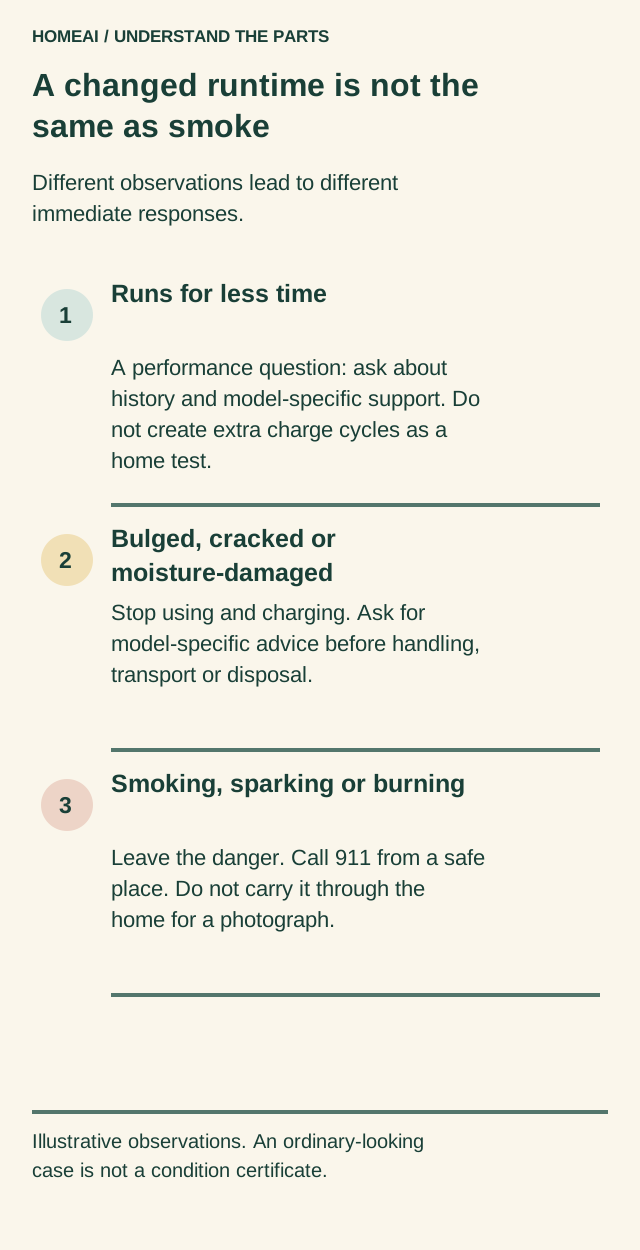
A changed runtime is not the same as smoke
Different observations lead to different immediate responses.
Choose a part name to highlight its explanation below.
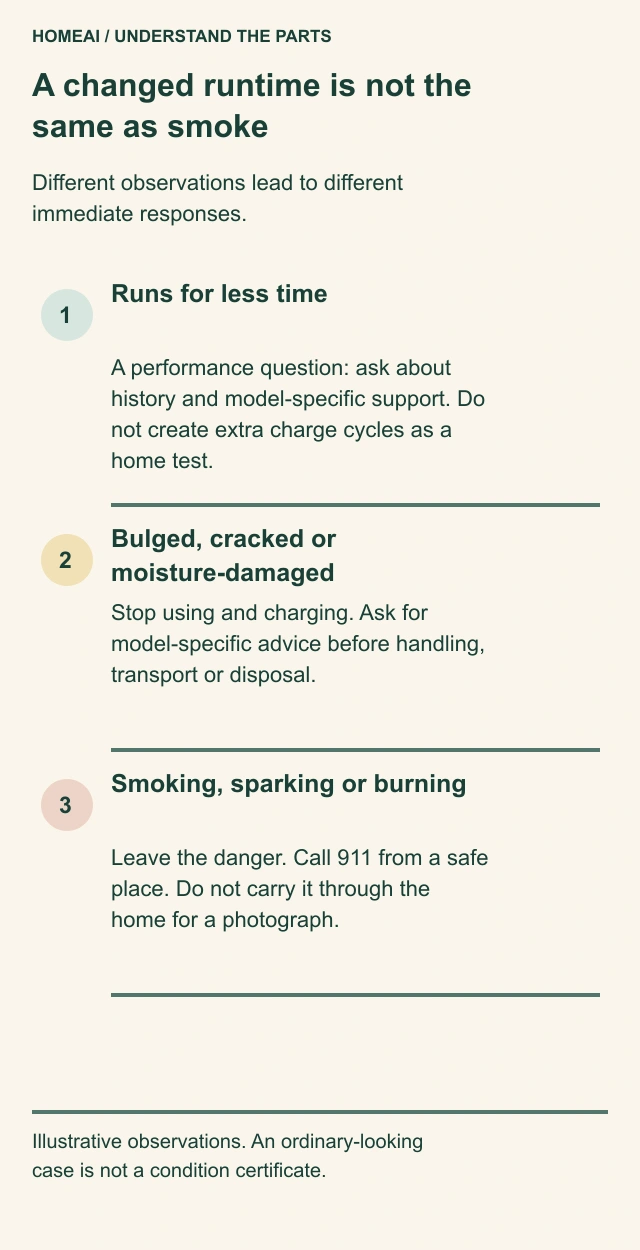
- Runs for less time
A performance question: ask about history and model-specific support. Do not create extra charge cycles as a home test.
- Bulged, cracked or moisture-damaged
Stop using and charging. Ask for model-specific advice before handling, transport or disposal.
- Smoking, sparking or burning
Leave the danger. Call 911 from a safe place. Do not carry it through the home for a photograph.
About this illustration
Illustrative observations. An ordinary-looking case is not a condition certificate.
A changed runtime is not the same as smoke
Different observations lead to different immediate responses.
- Runs for less time
- A performance question: ask about history and model-specific support. Do not create extra charge cycles as a home test.
- Bulged, cracked or moisture-damaged
- Stop using and charging. Ask for model-specific advice before handling, transport or disposal.
- Smoking, sparking or burning
- Leave the danger. Call 911 from a safe place. Do not carry it through the home for a photograph.
Read all the diagram text
- HOMEAI / UNDERSTAND THE PARTS
- A changed runtime is not the
- same as smoke
- Different observations lead to different
- immediate responses.
- 1
- Runs for less time
- A performance question: ask about
- history and model-specific support. Do
- not create extra charge cycles as a
- home test.
- 2
- Bulged, cracked or
- moisture-damaged
- Stop using and charging. Ask for
- model-specific advice before handling,
- transport or disposal.
- 3
- Smoking, sparking or burning
- Leave the danger. Call 911 from a safe
- place. Do not carry it through the
- home for a photograph.
- Illustrative observations. An ordinary-looking
- case is not a condition certificate.
What is worth keeping for the next person who uses it?
Keep a small identified set: the device model, battery model, intended charger, manual link and purchase details. Add the manufacturer’s answer if a replacement or condition concern arose. That is enough to stop a drawer of similar chargers becoming the household’s only matching system.
Make the everyday arrangement easy to explain. This equipment charges here; these ventilation openings stay clear; this is how its manual describes completion; and this is where its seasonal instructions are kept. Give another household member the actual manual, not a colour rule borrowed from a different charger.
Keep unresolved concerns visible in plain language: “Do not use this pack—case cracked; manufacturer advice pending.” Do not leave an uncertain item mixed among normal equipment where someone may assume it is available. Ask the responsible service about the safe arrangements for that item; do not improvise a containment or storage method from a label.
When equipment changes, revisit the charging place as well as the purchase. A new e-bike, larger tool battery or different charger can change the space and routine involved. The aim is practical understanding: recognize the parts, notice meaningful changes and know which response belongs to an ordinary question, a damaged item or an emergency.
Keep learning about the connected parts
- Home backup batteries: what stays on and for how long?
- Power bars, surge protection and UPS: understand the different jobs
- Smoke alarms and escape: understand the whole household plan
- Child safety throughout the home: understand access and the actual protection
- Build a home-care record that the next person can understand
Canadian context and authorities · Visual atlas · Learning labs
Know the parts.
Know what the words mean.
- Battery pack
- The enclosed battery assembly that stores energy for the identified device.
- Charger
- Equipment intended to put energy back into the matching battery.
- Compatibility
- Whether the exact device, battery and charger are intended to work together.
- Provenance
- Where the item came from and its purchase or replacement history.
- Charging status
- A model-specific indication of the charging process, not a complete condition assessment.
- Seasonal storage
- A longer period out of use, governed by that product’s instructions.
- Contacts
- The connection points where the pack meets its tool or charger.
- Strain relief
- The supported flexible section where a cable enters a plug or enclosure.
- Ventilation slots
- Openings that must remain clear as the manufacturer requires.
- Swelling
- An enlargement that can change the battery or surrounding device shape; it needs manufacturer attention.
Questions to bring
to the conversation.
- Can you identify the exact device, pack and charger without relying on colour or a fitting plug?
- Can charging be seen, with ventilation open and the household exit route kept clear?
- Has the item changed shape, suffered an impact, become wet or developed damaged cords or contacts?
- Do you know the manufacturer contact and the local service that will advise on this item’s condition before disposal or transport?
Separate a showing observation, an existing record and a new professional assessment. Unknown means a question remains; it does not automatically mean a defect.
Use the evidence planner ↗Go to the source.
Original HomeAI explanation informed by these public references. Sources support the underlying guidance; they have not reviewed or endorsed HomeAI. Diagrams are conceptual, and calculator outputs depend on your inputs.
Canadian public guidance and named manufacturer instructions are read together. Product, model and source-edition limits stay beside the relevant explanation; no illustrated device is a real incident or diagnosis.
Publication & source review
First published .
Sources reviewed .
- Health Canada · Lithium-ion battery safety
- Toronto Fire Services · Lithium-ion batteries
- Transport Canada · Lithium batteries: be aware of what you buy
- Milwaukee · M18 Dual Bay Simultaneous Rapid Charger 48-59-1802 / M18 battery packs operator manual
- Apple Canada · iPhone User Guide, Important safety information
- Dell · Handling swollen lithium-ion batteries, RevA05
Have a question about your home?
Start with the symptom, timing and what you have observed.
Ask HomeAI